Happy weekend project
Personal Repo for the project2022-11-21 - Issues, project tables, branches
Youtube video part 1 Youtube video part 2File -- Add local repository or Current repository -- arrow -- Add -- Add existing repository adds local repo to the list of repos on GitHub Desktop . You can publish repo through GitHub Desktop .
When creating comment file, use md (MarkDown) file format(e.g. comment.md).
PROJECT board should be created beforehand ISSUES so that issues are attached to the project board automatically. Issues should be listed on the board according to priority. Applying AGILE principles.
Possible Issues in GitHub could be:
- README
- Images
- Favicon
- Main layout
- Header
- Main content
Common brach structure: master -- develop -- issue .
To update branches locally in the terminal: git fetch origin
2022-11-22 - favicon, styling
Youtube video part 1 Youtube video part 2You can delete a branch directly in GitHub Desktop , because if the delete is made in GitHub ( Branch -- Delete... ), you will have to delete it on GitHub Desktop anyway. Connecting issue to a branch: in commit message add issue number (e.g.#2).
paint.net : Ctrl + i - invert selection.
paint.net : Ctrl + Shift + i - crops to selection.
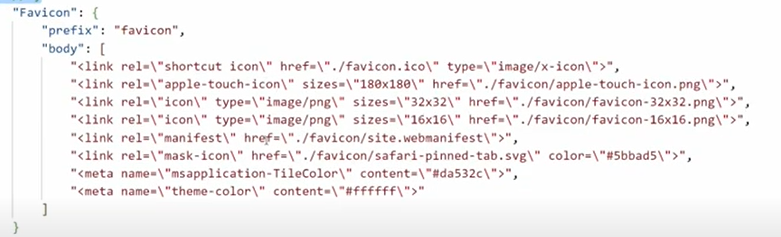
To link favicon in VS code use shortcut
link:favicon
.
Favicon generator link
.
- copy code from the favicon generator website
- paste it in html file
- save generated favicon folder in the project
- extract files
- rename folder to 'favicon'
- put
favicon.ico
file in the main folder
- make path changes to favicon folder in the copied code.
When only
floating elements
are included in a
block element
, block element (i.e. parent element) has no height, therefore parent's display should be changed to
inline-block
.
margin: 0 auto
works for
block elements
only.
CSS : margin: calc((100% - elWpx) / 2) centers element.
CSS
:
selector:first-child { }
selects element that is the first child of its parent.
CSS
:
element>element
selects all elements where the parent is the first element.
Homework readings: CSS selectors .
2022-11-23 - styling, selectors
Youtube video part 1 Youtube video part 2
All text properties are inherited (with several exceptions., e.g. anchor tag). Therefore set
font-family on body tag.
If border is needed around element on hover, put transparent border on static element as well
so thet it will not influence position of other elements when hovering.
CSS : box-shadow: offset-x offset-y blur-radius spread-radius color ;
To use
em
instead of px, font-size must be set. Pay attention, that
line-height default is 1.2
of font-size. Therefore, set line-height same as font-size to have better control over vertical
spacing in nav.
font-size and line-height should ALWAYS be paired to prevent distortion when browsers change
default line-height
.
When font-size of the element is set, it makes sense to set all other property values in em
so that sizing changes proportionally all the time by changing only one value (font-size).
Example using em:
- .btn-home {
- display: inline-block;
- text-decoration: none;
- color: white; background-color: #61ae4f;
- font-size: 20px;
- box-shadow: 0.1em 0.25em 0.6em -0.1em #61ae4f;
- margin-top: 0.5em;
- padding: 0.5em 1em;
- transition: all 0.5s;
- }
Useful links:
- Font Awesome - only css and fonts folders are needed.
- Imgbot
You can find actual font applied by the browser by selecting an element and going to Computed styles (bottom line 'Rendered Fonts' ).
2022-11-24 - Font Awesome, CSS classes, custom properties
Youtube video part 1 Youtube video part 2Changing package.json author and licence defaults: Change Default NPM License .
Usa class attribute instead of element selectors to improve readibility and attach meaning. Moreover, after changing html structure you won't need to change styling, because classes remain same.
FontAwesome is based on classes ('fa fa-iconName'). FontAwesome classes are 'described' in css folder font-awesome.css and font-awesome.min.css files. Only font-awesome.min.css file is needed and linked to HTML file. You can merge FontAwesome icons with anchor tags, by putting FontAwesome classes ('fa fa-iconName') into anchor tag and deleting icon tags.
Third party styles should be linked before our own css.
CSS custom properties
:
:root {
--main-color: #1f4d14;
}
Coming soon
Personal Repo for the project2022-11-28 - snippets, responsive design, organizing CSS files/folders, resetting defaults
Youtube video part 1 Youtube video part 2
You can select creating
Licence
'commit directly to the develop branch'.
CTA
- Call To Action.
Snippets are shortcuts to text templates. To access snippets in VS code Ctrl + Shift + p -- Snippets: Configure User Snippets -- select htm, css or other
Structuring CSS folders :
- 3rd-party
- base
- components
- pages
To reset default styling (margins, padding and etc.), use body and body * selectors (base.css).
CSS : box-sizing: border-box; - calculates width including content, padding and border.
2022-11-29 - @media, working with branches locally, Flexbox
Youtube video part 1 Youtube video part 2
If direct changes are made to develop branch (e.g. direct pull request from Imgbot ) - pull requests
should be made from develop to lower level branches to prevent differences, synchronize changes in
VS code.
Class
'container'
is used for 100% width general blocks in a website.
CSS
:
@media (min-width, max-width etc.) { }
is used for different breakpoint styling.
Working with branches locally
Branches can be deleted in VS code:
Source Code (Ctl + Shift + G) -- ... -- Branch -- Delete Branch
.
To update information locally, in terminal:
$ git fetch -p
or
$ git fetch --prune
dumps old files and renews info
$ git fetch origin -p
full version.
Useful links:
2022-11-30 - flexbox, FontAwesome, HTML entities
Youtube video part 1 Youtube video part 2
320px
will be the least width to which we will addapt in @media.
An
HTML entity
is a piece of text ("string") that begins with an ampersand (&) and ends with a semicolon (;).
Frequently used to display reserved characters.
HTML Entities
2022-12-01 - components, progress bars, pseudo elements
Youtube video part 1 Youtube video part 2One CSS selector should not inlcude more than 3 classes (start and end classes is a must).
2022-12-05 - setting margin/padding values, variables, colors(hsv, rgb, hex)
Youtube video part 1 Youtube video part 22022-12-06 - background-image, background properties, min-height/max-height, background-attachment, scroll to top, @keyframes, transform: translate
Youtube video part 1 Youtube video part 2The background-image property sets one or more background images on an element. background-color must be also indicated in case the image is no longer available.
background-repeat CSS property sets how background images are repeated. Values: repeat, no-repeat, repeat-x, repeat-y .
background-position CSS property sets the initial position for each background image. Values: top, bottom, left, right, center, top left, top right and etc. . It can be also set as % values.
background-size roperty sets the size of the element's background image. The image can be left to its natural size, stretched, or constrained to fit the available space. Values: auto (default), contain, cover .
- vmin is the minimum between the viewport's height or width in percentage depending on which is smaller.
- vmax is the maximum between the viewport's height or width in percentage depending on which is bigger.
Important: % and vw difference is that, % does not take scroll into account, while vw does (therefore bottom scroll might occur).
background-attachment CSS property sets whether a background image's position is fixed within the viewport, or scrolls with its containing block. Values: scroll (fixed relative to the element itself), fixed (relative to viewport) . Can be used for hero parallax.
Example of back-to-top 'button':
< a href="#" class="fa fa-angle-up back-to-top" > </a >
.back-to-top {
- background-color: var(--secondary-color);
- width: 50px;
- height: 50px;
- border-radius: 50%;
- position: absolute;
- top: -30px;
- right: -15px;
- color: #fff;
- font-size: 30px;
- text-align: center;
- line-height: 50px;
- text-decoration: none;
- transition: all 0.5s;
}
Set scroll-behavior: smooth; for 'html' tag.
@keyframes identifier { } controls the intermediate steps in a CSS animation sequence by defining styles for keyframes (or waypoints) along the animation sequence. Animated element must have at least animation-name (includes keyframes identifier) and animation-duration . animation-iteration-count indicates how many times animation should be played. animation-delay is used before animation starts, but not for every iteration. For iterations to delay e.g. at the beginning, include two breakpoins in keyframes with same properties - this will delay indicated % of the breakpoint *total duration time.
transform: translate() CSS function repositions an element in the horizontal and/or vertical directions relative to 'itself'. Possible values: translate(), translateX(), translateY()
2022-12-07 - forms, CSS grid
Youtube video part 1 Youtube video part 2
grid-template-columns;grid-column
grid-template-area;grid-area
JS Intro
Personal Repo for the project2022-12-08 - Introduction to JavaScript: numbers and strings
Youtube video part 1 Youtube video part 2To start with JS in VS code npm i - D nodemon . In package.json add all js files according to the name e.g. in 'scripts' "strings": "nodemon ./js/03-strings.js", .
Practice for homework: JavaScript mini užduotys .
2022-12-15 - codewars platform, example exercises, for loop examples, validations
Youtube video part 1 Youtube video part 2
isNaN()
returns true or false.
isFinite()
determines whether the passed value is a finite number. If the argument is NaN, positive infinity,
or negative infinity, this method returns false; otherwise, it returns true.
2022-12-19 - reverseString, rangeDivide, digitCount, biggestNumber exercises
Youtube video part 1 Youtube video part 2Array.isArray(arr) determines whether the passed value is an Array.
2022-12-20 - ternary operator, string methods, arrow functions, destructuring and spread(...)
Youtube video part 1 Youtube video part 2
Number.prototype.toString()
Number.prototype.toString(radix)
returns a string representing the specified number value.
parseInt(string)
parseInt(string, radix)
parses a string argument and returns an integer of the specified radix (the base in mathematical
numeral systems).
Array(length).fill(0) fills array with 0 values indicated number of times (length).
[...Array(n).keys()] another way to create new array with keys equal to index
RegexLearnRegex on MDN
2022-12-21 - spread and rest operators, loops (while, for of, forEach, for in), map method, primitive vs referrence data types
Youtube video part 1 Youtube video part 22022-12-22 - copying multi level arrays, map method, filter, sort, reduce
Youtube video part 1 Youtube video part 22022-12-27 - reduce method, parseInt, parseFloat, toFixed, classes
Youtube video part 1 Youtube video part 2String.fromCharCode() method returns a string created from the specified sequence of UTF-16 code units.
class Dog {
constructor(name) {
this.name = name;
this.behavior = 0;
}
}
const dog1 = new Dog('Rex');
Exporting/importing variables from other files:
- Changes in package.json : insert "type": "module", above 'main'
- Exporting from file where variable originates: export default Variablename
- Import to a file, where variable is needed: import Variablename from "./Filename.js"
According to the old way: export
module.exports = Variablename
,
import:
const Variablename = require('./Filename')
2022-12-28 - classes, imports/exports, this keyword
Youtube video part 1export {variablename1, variablename2...} and import {variablename1, variablename2..} from './Filename.js allows to import/export several variables at once, prevents from changing variable names in import file (unless explicitly indicated with variableName as newVariableName )
import * as objName from './Filename.js allows to import object of variables from another file.
2022-12-29 - solving Git conflicts, kioskas homework solution
Youtube video part 1 Youtube video part 2Portfolio project
React group project2023-01-02 - Portfolio project setup
Youtube video part 1 Youtube video part 2Use .gitkeep files to be able to commit empty folders.
2022-01-03 - Group portfolio project, js file imports, importing and downloading fonts
Youtube video part 1 Youtube video part 2home.js should be linked to HTML at the end of the body tag. <script src="./js/pages/home.js" type="module" defer></script>;
2022-01-04 - Group portfolio project, 12 col grid system
Youtube video part 1 Youtube video part 22023-01-05 - Group portfolio project, 12 col grid system, margins and visibility, specificity
Youtube video part 12023-01-09 - Group portfolio project, pseudo elements, content rendering with js
Youtube video part 1 Youtube video part 2::selection pseudo-element applies styles to the part of a document that has been highlighted by the user (such as clicking and dragging the mouse across text).
element.innerHTML gets or sets the HTML or XML markup contained within the element.
document.getElementById() returns an Element object representing the element whose id property matches the specified string.
2022-01-10 - Group portfolio project, content rendering, best data formats for content rendering, validations, throw new Error, Math library, static methods
Youtube video part 1 Youtube video part 2throw throws a user-defined exception. Execution of the current function will stop (the statements after throw won't be executed)
Example
function getRectArea(width, height) {
if (isNaN(width) || isNaN(height)) {
throw new Error('Parameter is not a number!');
}
}
2022-01-11 - Goup portfolio project (gallery), js documentation
Youtube video part 63 Youtube video part 642022-01-12 - Group portfolio project
Youtube video part 65 Youtube video part 66object-fit, object-position
2022-01-16 - Group portfolio project, introduction to DOM
Youtube video part 67 Youtube video part 68aspect-ratio CSS property sets a preferred aspect ratio for the box, which will be used in the calculation of auto sizes and some other layout functions.
object-fit CSS property sets how the content of a replaced element, such as an img or video, should be resized to fit its container.
document.getElementsByTagName(name) returns an HTMLCollection of elements with the given tag name.
Element.classList is a read-only property that returns a live DOMTokenList collection of the class attributes of the element. This can then be used to manipulate the class list.
DOMTokenList.remove() method of the DOMTokenList interface removes the specified tokens from the list.
DOMTokenList.toggle() method of the DOMTokenList interface removes an existing token from the list and returns false. If the token doesn't exist it's added and the function returns true.
DOMTokenList.contains() method of the DOMTokenList interface returns a boolean value — true if the underlying list contains the given token, otherwise false.
Document.querySelector(selector) returns the first Element within the document that matches the specified selector, or group of selectors. If no matches are found, null is returned. Selectors are same as in CSS
EventTarget.addEventListener(event, function) method sets up a function that will be called whenever the specified event is delivered to the target.
Document.querySelectorAll(selector) method returns a static (not live) NodeList representing a list of the document's elements that match the specified group of selectors.
2023-01-17 - Group portfolio project (gallery js, validations)
Youtube video part 69 Youtube video part 702023-01-18 - Group portfolio project (gallery - filter generation), intro to backend, creating server
Youtube video part 71 Youtube video part 72To launch index.js in node:
- $node ./index.js
- $node ./
- $node .
Server project
Personal Repo for the project2023-01-19 - back-end, creating server
Youtube video part 73 Youtube video part 74http.createServer(optional: requestListener) method turns your computer into an HTTP server and creates an HTTP Server object.
function (request, response) { } The requestListener is a function that is called each time the server gets a request.The function is passed as a parameter to the http.createServer() method. The requestListener function handles requests from the user, and also the response back to the user.
REQUEST: IncomingMessage ObjectRESPOMSE: ServerResponse Methods and Properties
server.listen(optional: port, hostname, backlog, callback) method creates a listener on the specified port or path. server.listen() Method
2023-01-23 - config file, routes, class inheritance
Youtube video part 75 Youtube video part 76to add NODE_ENV=value parameter in the terminal write NODE_ENV=value node . Parameter will be put under process.env object.
2023-01-24 - utility functions, CRUD intro, fs module, await-async functions, promises
Youtube video part 77 Youtube video part 782023-01-25 - CRUD functions, async functions, cookies, cache, fs.unlink(), writeHead()
Youtube video part 792023-01-26 - Mime types, register page, form validations
Youtube video part 80 Youtube video part 812023-01-30 - working with form, sending a POST request to a server, buffer parse (StringDecoder), saving data
Youtube video part 82 Youtube video part 83REACT
Personal Repo for the project2023-02-09 - Lesson 007: React elements, using styling in the elements, properties (props), using Sass
Teams video 72023-02-14 - Lesson 009: useState() with rectangles, Unique identifiers
Teams video 92023-02-28 - Lesson 016: Servers, browsers, requests, responses
Teams video 16Request methods - CRUD
- GET - READ
- POST - CREATE
- DELETE - X 2
- PUT - EDIT
Request is a string consisting two parts: HEADER (additional info for browser) and BODY (main info). Important information in the header is content-type (e.g. text/css)
Main response part is Status Code
Installing Express: Getting started with Express. Install in different folder than React. Create app.js file in the folder, copy Hello world example. Change port 3000 to something else. Install nodemon ( npm i -D nodemon). Add script to launch nodemon "scripts": { "start": "nodemon app.js" }
2023-03-01 - Lesson 017: CORS, CRUD (get, post, delete)
Teams video 17npm i cors in server folder
To start server include code app.use( express.urlencoded({ extended: true, }) ); app.use(express.json());
2023-03-02 - Lesson 018: Edit (put), context
Teams video 18Creating context const ContextData = createContext();
USing context data const sq2 = useContext(ContextData);. This creates a hook